Playing Chords
November 13, 2022

Within this page you can download some data examples for scales, instruments, reverberations and chords to be used with the Escalador Audio application.
Scales
Chromatic scale
ChromaticScale
1/12-tone scale TwelveOfToneScale
1/5 tone scale
FifthOfToneScale
1/4 tone scale
QuarterOfToneScale
1/3 tone scale
ThirdOfToneScale
Scales of harmonics
Scale of harmonics of C -1
C-1@A=440Hz-Index=1
Scale of harmonics of A0
A0@A=440Hz-Index=1
Scale of harmonics of A0
A0@A=440Hz-Index=1.25
Scale of harmonics of A0
A0@A=440Hz-Index=0.78
Scale of harmonics of A0
A0@A=440Hz-Index=0.2
Instruments
Atmosferas-1
Atmosferas-1
Choir
Choir-26Sept2022
J.C.Risset (Remembering)
Risset-2
Violoncello
Vc-1[INST].txt
Gong&Cymbals
Gongs&Cymbals[INST].txt
Reverberations
Atmosferas-1
Atmosferas-1[REV].txt
Choir
Choir-26Sept2022
J.C.Risset (Remembering)
Risset-2
Violoncello
Vc-1[REV].txt
Gong&Cymbals
Gong&Cymbals-1[REV].txt
Chords
Chords 1
1[CHORD-R].txt
Chords 2
2[CHORD-R].txt
Chords 3
3[CHORD-R].txt
Chords 4
4[CHORD-R].txt
Chords Gong&Cymbals
Gongs&Cymbals-1[CHORD-R].txt
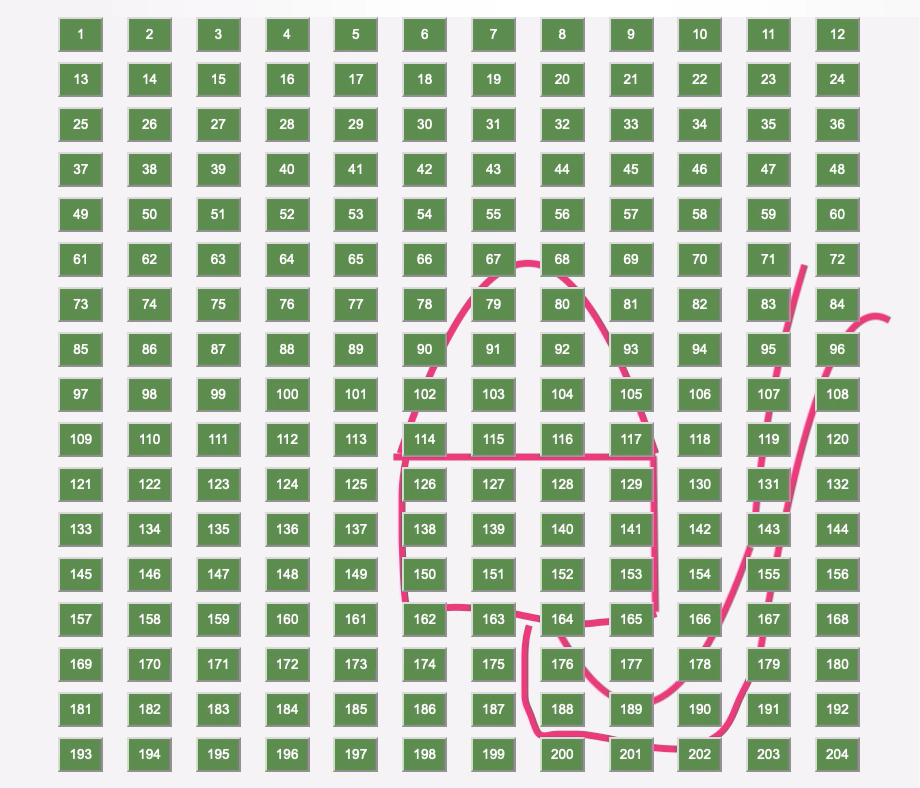
Idea #1 One of the challenges in using the Escalador platform: Escalador and Escalador Audio – apart of been used by composers, musicians, researchers, etc. – could be, it use as a tool for improving the creativity and development of young students. Of course, the Escalador – the scales calculator – maybe have to be used by students from the age of 12. But the Escalador Audio can be a very interesting and amazing creative tool for children. I experienced myself this with my grand daughter when she was six years old. Here is the story. When I was developing the Escalador Audio in 2019, I was wondering what cold be the impact of the Escalador Audio on young people. So I proposed to my grand daughter to make a little design that will be used as a background for the keyboard of the Escalador Audio. Then I invited her to use the computer mouse over the Escalador Audio keyboard. I said to her to try to follow with the mouse the lines present on her design. I was very funny and interesting to hear the sounds produced. with the help of parents and teachers, etc. One of the challenges in using the Escalador platform: Escalador and Escalador Audio – apart its utilization by composers, musicians, researchers, etc. – could be, it use as a tool for improving the creativity and development of young students. Of course, the Escalador, – the scales calculator –, maybe have to be used by students from the age of 12. But the Escalador Audio could be use by children with the help of parents and teachers, etc.
One of the challenges in using the Escalador platform: Escalador and Escalador Audio – apart of been used by composers, musicians, researchers, etc. – could be, it use as a tool for improving the creativity and development of young students. Of course, the Escalador – the scales calculator – maybe have to be used by students from the age of 12. But the Escalador Audio can be a very interesting and amazing creative tool for children. I experienced myself this with my grand daughter when she was six years old. Here is the story. When I was developing the Escalador Audio in 2019, I was wondering what cold be the impact of the Escalador Audio on young people. So I proposed to my grand daughter to make a little design that will be used as a background for the keyboard of the Escalador Audio. Then I invited her to use the computer mouse over the Escalador Audio keyboard. I said to her to try to follow with the mouse the lines present on her design. I was very funny and interesting to hear the sounds produced.